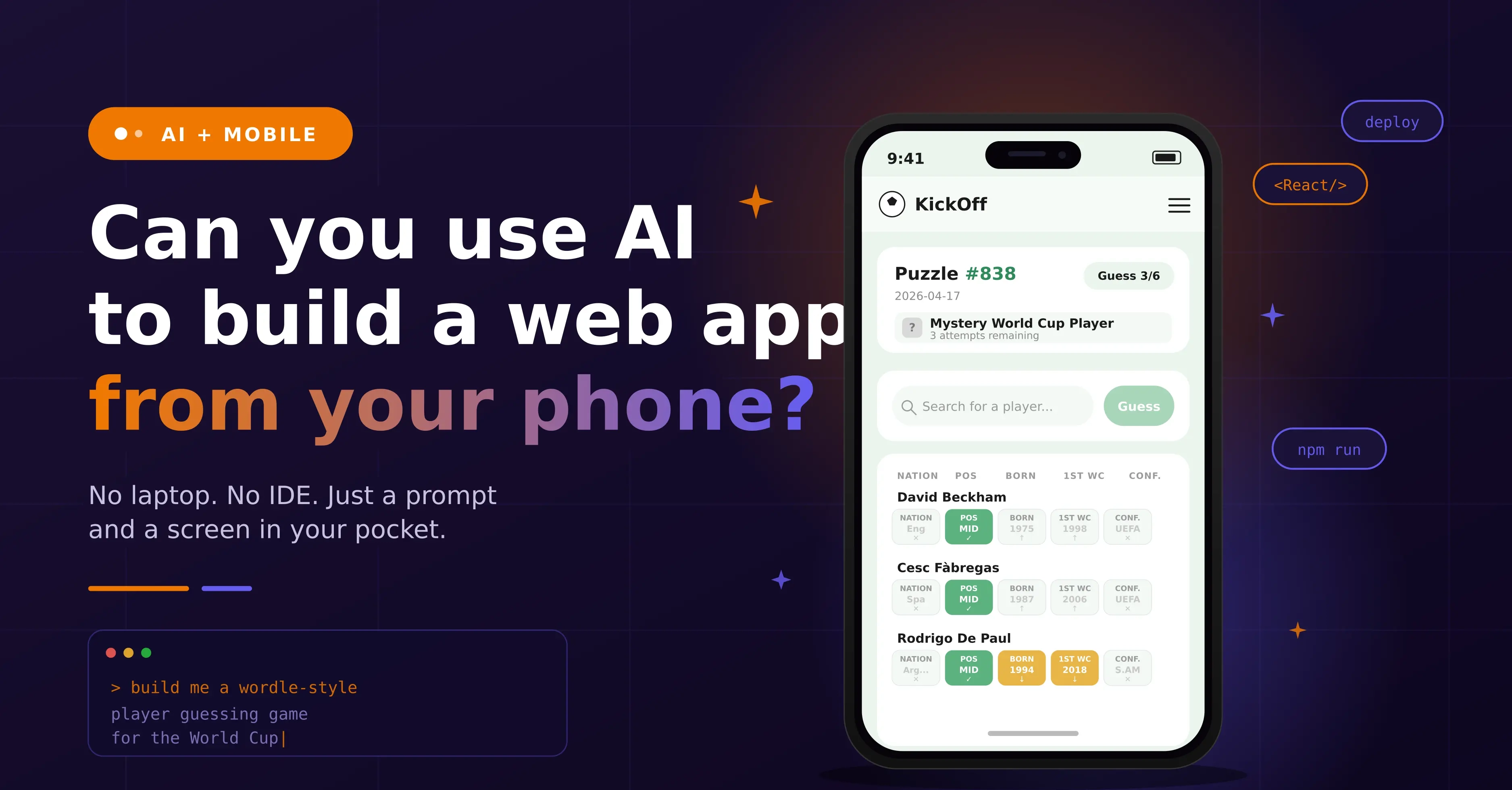
Can you use AI to build a web app from your phone?
I’ve been watching what Daniel Toledo has been doing with Base44. He’s making some amazing products and quickly. Not just “look what I made in 10 minutes” nonsense – he’s building things that entertain, or solve problems people are having.
And like most things I see that are truly cool, my reaction wasn’t “wow that’s cool”. It was: “Really impressive, but can I do it differently?” I can’t help it, I’m wired to try to do things differently.
The Idea
In conversation with Daniel a few weeks back we both agreed we should team up and do something around the upcoming World Cup. I loved the idea of teaming up with someone as incredible as Daniel, so added it to my ever-growing list of fun projects.
Daniel then, almost immediately, sent me his first attempt – a daily game called Code44 – which immediately impressed and intimidated me. I hadn’t even got past adding it to my todo list. I needed a bit more brain-space before I responded… but after a bit of thinking about how I wanted to answer the brief, I was ready.
Daniel had already set the ball rolling (excuse the football pun), so no need to reinvent the wheel… I decided to keep it simple and follow suit, creating a daily World Cup guessing game:
- one play per day
- hints after each attempt
- shared daily puzzle
- social share at the end
That’s right, I’ve created Wordle… well a niche football version. Enough moving parts to be interesting. A mechanic that works (I see a lot of people playing the LinkedIn games, including myself). But also simple enough not to spiral out of control – this is meant to be fun after all.
The Rules (Self-Imposed, Obviously)
If you’re going to try something like this, you may as well make it awkward.
So:
- no computer/laptop
- no IDE (sorry Cursor)
- just my phone
Okay, it’s not literally just a phone. I needed some tools too – but I controlled all of them from my phone, so that counts.
I used:
- iPhone 17 Pro Max (The orange one, of course)
- Claude Code to actually build
- GitHub to store it
- Vercel to deploy straight from GitHub
- Turso for the database (mainly because I was already using it elsewhere)
So, the goal is set: Build and deploy a webapp using just a phone
Why I Chose Claude AI?
So why did I actually choose Claude? Simple, because I already have a Claude Pro subscription – why pay for something new? And also, from my brief testing, Claude Code really does work on a phone (although the rate limits could get in the way on the cheapest subscription).
The Claude app is relatively intuitive, and importantly – I like the output. Most importantly, however, it handles structured thinking well — which is the only way this test works.
Note: Opus 4.6 was the foundation model at the time of building – this was used for this test.
The Bit Most People Get Wrong
The build is handled by AI, so you need to concentrate on the prompt(s).
If you say:
“build me a Wordle-style game”
You’ll get something rushed, generic, and slightly broken.
Conversely, if you try to do too much at once you get a mess too. It’s generally better to start small and then build on once the basics are right.
But I didn’t want to spend hours going back and forth trying to get what I wanted. I wanted to try to one-shot an web app. So what should I do?
I gave it:
- constraints
- structure
- rules about what not to build
- rules about testing itself
- I kind of treated it like a junior that I’ve just hired but haven’t quite decided if I trust yet.
STRICT MVP CONSTRAINTS
* NO public leaderboard
* NO user accounts
* NO authentication
* NO persistent personal stats
* Anonymous gameplay only
* Minimal server-side data storage
* Architecture must remain extensible for future:
* login
* personal stats
* streaks
* leaderboard
Cutting Scope
This is where these things usually fall apart. You’re building an Minimum Viable Product, but for some reason you have all the bells and whistles from the start. The whole project becomes a huge monolith; a “quick little game” suddenly has:
- login flows
- user profiles
- leaderboards
- stats dashboards
And now you’ve built nothing other than a GDPR nightmare (if you are lucky).
So I cut it all, no user accounts, no leaderboards, and no stats (not yet anyway)
Just:
- one session per day
- one simple puzzle
- one sharable result
- A limited data-set (not all players added)
That’s enough. That was the scope of my MVP.
CORE FEATURES
1. DAILY PUZZLE SYSTEM
* One puzzle per day
* Configurable reset timezone
* Same puzzle for all users
* Answer stored server-side only
* Not exposed in client
2. GUESSING MECHANIC
* 6 attempts max
* Autocomplete input from valid dataset
* Invalid guesses blocked
* Clear, structured feedback per guess
* Mobile-first UX
3. RESULT STATES
* Win / lose state
* Attempt tracking
* Answer reveal
* Countdown timer
4. SOCIAL SHARE
* Spoiler-free output
* Copy to clipboard
* Native mobile share where supported
* Includes:
* game name
* date or puzzle number
* attempts (e.g. 3/6 or X/6)
* emoji/grid style output
* Must NOT reveal the answer
How To Handle Replay Abuse
Wanting a game that has no login but also tries to ensure a fair single play per day was an interesting challenge. No login means people can:
- clear cookies
- refresh
- go again
You are not solving that properly without having some form of login. So, I didn’t try to solve it. But I still wanted to make it one play only, so I looked for ways to discourage replay abuse.
My thinking is simple, “make it annoying enough that most people won’t bother”
- So, it had to have a server-issued token
- A httpOnly cookie
- Basic hashed session tracking in Turso
- Light fingerprinting (nothing creepy)
- A bit of IP-based logic
And the key bit, if someone clearly replays it… that’s fine. But their result isn’t treated as “official”.
That’s enough to keep things honest and fun and satisfy my need to solve a problem (that may never exist).
ANTI-REPLAY / ABUSE CONTROL (NO LOGIN)
Implement best-effort replay prevention using a layered approach.
* Issue a signed daily play token from the server
* Store token in httpOnly cookie
* Track daily session server-side using TursoStore per session:
* puzzle_date* token_hash* coarse_fingerprint_hash
* coarse_ip_hash (salted/short-lived)
* attempt_count
* completion_state* timestampsRules:
* Max 6 attempts enforced server-side
* One official completion per environment per day
* Cookie cleared → fallback to fingerprint + IP soft matching
* Suspicious replay:
* allow play
* mark as unofficial (no official share)Do NOT:
* use invasive fingerprinting
* store raw IP long-term
* claim full prevention
Making It Look Like a Finished Product
Most “MVPs” look exactly like MVPs. The goal here was to deliver something that looks like a finished product but had MVP functionality.
The aim was:
- clean
- minimal
- modern
- mobile-first
DESIGN / UI DIRECTION
Must feel premium. Not a prototype.
Style:
* modern
* minimal
* clean
* high-end consumer product feelInspired by:
* Apple / Samsung design principles (not branding)
Qualities:
* strong spacing
* excellent typography
* subtle depth
* refined interactions
* calm paletteAvoid:
* clutter
* loud gradients
* casino-style visuals
* gimmicky animation
Game feel:
* Premium product first, game second.
---
DESIGN SYSTEM (REQUIRED FIRST)
Define before UI:
* colour palette
* typography scale
* spacing
* radius
* shadows
* motion rules
Apply consistently.
So I gave some basic design and UI direction to follow – nothing too constrained, but enough that the output felt more finished product and less thrown together while watching The Pitt with my wife.
Letting It Actually Run
The interesting bit wasn’t building it. It was not interfering.
I set the rules:
- build in phases
- run checks
- fix issues
- move on
And left it to get on with it. This feels slightly uncomfortable… is kind of the point of this test, so I left it to it.
The Bits I had To Do
- I had to setup a GitHub Repository. It’s a simple task, but can be daunting if you’ve never done it.
- I had to setup the database in Turso. That’s ridiculously easy, just a couple of clicks.
- I setup a Vercel project and linked it to the GitHub Repository. Again, just a couple of clicks and I was done.
- Finally, I entered the relevant environment variables. Claude told me what these were, but I had to supply the keys to connect everything together securely.
What did it deliver? A fully functioning daily football player guessing game. Is it perfect, no. Will I spend a bit of time polishing it to look how I want it to? Most likely. But all told, it has produced something that is genuinely quite impressive considering other than writing the prompt, I put very little thought into it.
What I Took From It
- Prompting is now more than half the job: If you’re vague, the output is vague. The clearer you are as to what the desired outcome should be the better.
- Most people overbuild immediately: You don’t need more features, you actually need fewer decisions.
- You can genuinely ship from your phone: Yeah it is not perfect, and there are some things that are just easier when you have a keyboard and a mouse. But it is absolutely doable these days to build a full product while sat on the toilet 🙈
The Actual Point
This isn’t really about what AI tools you use. They all have their good and bad points. Choose something that you are comfortable with and gives you the result you want. It’s not even about the game; this was just a vehicle for my mobile creation test. It's not about how AI is fragmenting search, or how to navigate visibility in today's world.
It’s about how things are changing, and just how fast… I mean just yesterday Claude released their latest model Opus 4.7 which is reported to benchmark better than Opus 4.6. The barrier to entry just got a lot lower. You don’t need to know how to write code anymore - but it still does help. You don’t need a powerful computer, although that won’t stop me having one. The skill now is in defining processes and systems and letting AI execute them with guidance and guardrails to keep everything on track.
So, if you’re still thinking “how do I code this?” you’re probably asking the wrong question. With the advent of vibe coding, you should be thinking how do I translate my idea into words that a machine can interpret.
A note of caution
Security is key, especially when handling other people’s data. Be sure that everything you do is secure and that you’re not exposing data or API keys in your vibe coded projects.